
Sipping coffee close to midnight, I realised how much time we were losing on tiny digital tasks. An image was too heavy, a WebP file would not open, and a headline needed checking. None was difficult, yet each interrupted the real work.
That friction is becoming more common. MarTech reports that 62.1% of marketers were using more tools than two years earlier. The finding from the State of Your Stack survey shows how fragmented everyday digital work has become.
As a digital growth strategist, I help founders and business owners improve how they work online. I repeatedly see small digital tasks consume far more time than they should. That gap pushed me to ask our team to build simpler, practical tools people could use every day.
In this edition, most everyday digital tasks do not need another heavy platform. They need one focused tool that solves one problem well. That idea with the coffee led to 12 free online tools for image, SEO, research and document tasks, designed for marketers, creators, students and small teams.
Also Read:
- Maintaining Newspaper Press Performance During Peak Production
- Employee Burnout in India: The Silent Crisis Inside Modern Work
Online Tools Are Replacing Heavy Software for Small Tasks
Not every digital job needs a full software suite. For many quick tasks, online tools and lightweight digital tools offer a faster route because the work happens directly inside a browser.
Online tools are browser-based utilities designed to complete specific digital tasks without requiring software installation. They are usually built around speed, single-purpose functionality and minimal setup, making them useful when users need to solve one problem and move on quickly.
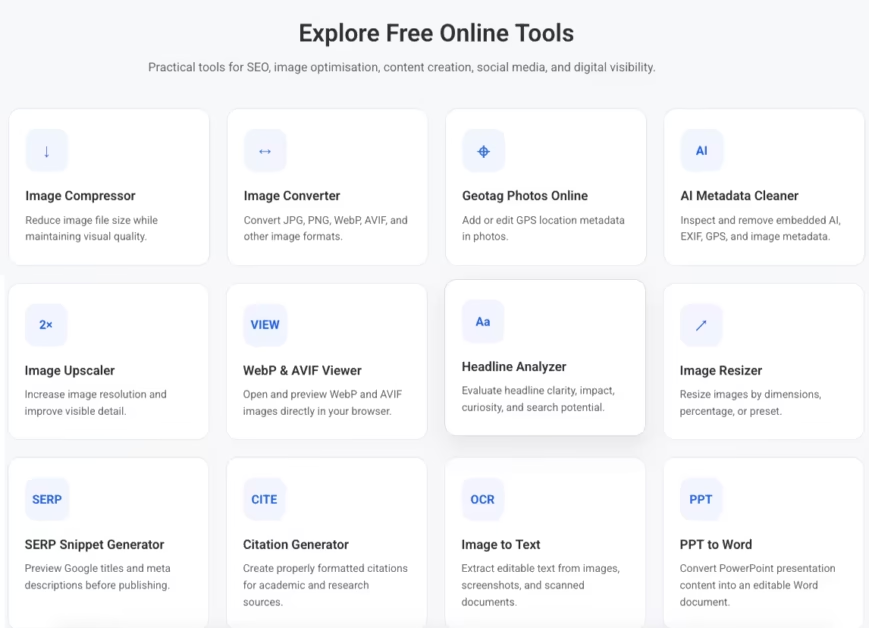
Small Digital Tasks Now Fill the Working Day
A normal digital workflow now includes dozens of minor jobs. Images need compression, formats need changing, dimensions need adjusting, headlines need checking, and references need formatting. None of these tasks appears significant alone.
The problem begins when each task sends you somewhere different. Switching repeatedly between platforms breaks concentration and adds unnecessary steps. Simple tasks can become unnecessarily slow when content creation tools are buried inside complex platforms designed for much larger workflows. The same shift is visible in publishing, where stronger guest blogging strategies increasingly depend on efficient research, writing and distribution workflows.
Browser-Based Tools Remove the Need for Installation
Browser-based tools simplify this process because users can open a utility, complete the task and return to their work. For straightforward jobs, this can reduce downloads, setup time and dependence on device-specific software.
AI-assisted workflows are pushing this further. Search, writing and publishing increasingly happen across connected browser environments, making focused browser utilities a natural part of everyday digital work. This shift also connects with how AI is changing search behaviour and digital discovery.
A better question to ask yourself, is whether the task actually needs another platform at all. It is which recurring jobs deserve a simple dedicated tool. Images are often the best place to start.
Online Tools Fix Image Size and Format Problems
Preparing images usually involves shrinking file size, setting the right dimensions and choosing a format that suits the destination platform. The right online image tools can handle these tasks quickly without opening heavy editing software.
Image Compressor: Reduce Image File Size
Heavy images can slow webpages and exceed upload limits. Image compression helps reduce file weight without making every image-editing task dependent on full software.
- Function: Reduces file size while keeping useful visual quality.
- Use it when: A webpage feels slow or the image exceeds an upload limit.
Use the Image Compressor when page speed or file-size limits become the immediate problem.
Image Resizer: Set Exact Image Dimensions
Websites, documents and social platforms often require different dimensions. Image resizer helps prepare one visual for multiple placements without rebuilding the asset each time.
- Function: Adjusts image dimensions for websites, documents and social platforms.
- Use it when: One image must fit several placements.
Use the Image Resizing Tool when the image itself works, but its dimensions need adjusting.
Image Upscaler: Enlarge Small Images Online
Small or older images may not fit larger layouts. An image upscaler can make an undersized source more usable when no better original is available.
- Function: Increases image dimensions and improves usability.
- Use it when: The only available source image is too small.
Use the Image Upscaler when enlargement is the main requirement.
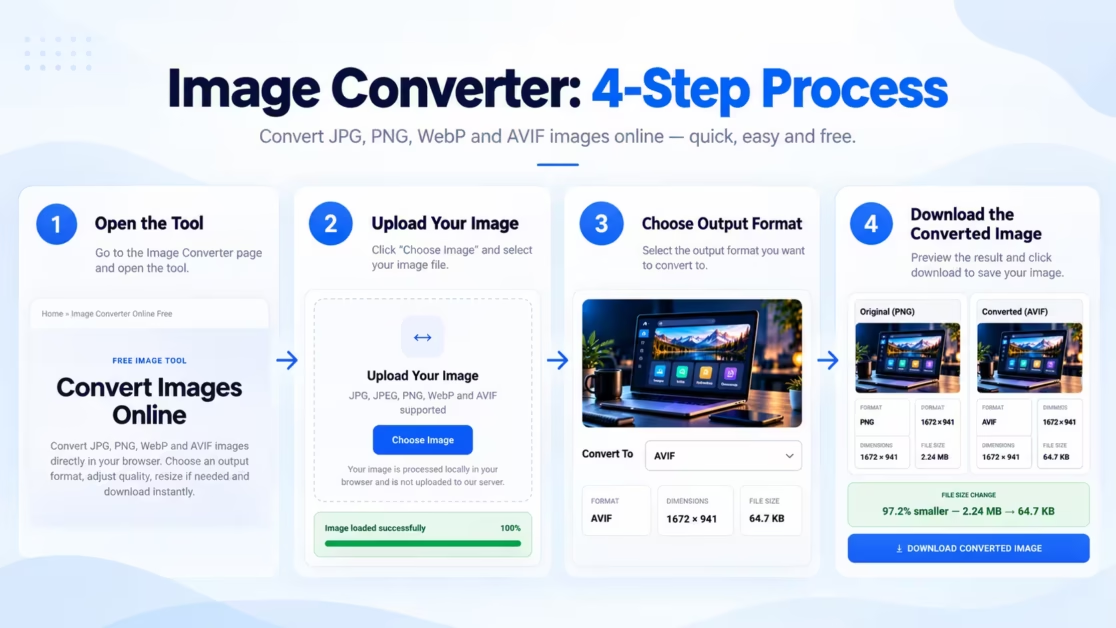
Image Converter: Convert Between Image Formats
A file in the wrong format can interrupt an otherwise simple workflow. Image conversion solves compatibility problems when a platform requires a different file type.
- Function: Converts between commonly used image formats.
- Use it when: A platform or client requires another format.
Use the Image Converter when a different file format is needed for compatibility.
Once file size, dimensions and format are sorted, attention shifts to the information carried within the image. Images also contain metadata, location information and readable content that may need to be accessed, removed or changed.
Online Tools Read and Manage Image Data
Images contain more than visible pixels. File formats, hidden metadata, geographic information and embedded text can all affect how an image is opened, shared or reused. These free online tools help manage that less visible layer.
WebP and AVIF Viewer: Open Modern Image Formats
WebP & AVIF help reduce file size, but not every device or application handles these formats smoothly. A browser-based viewer lets users check the image directly without first changing the file type.
- Function: Opens WebP and AVIF images directly in a browser.
- Use it when: Your device cannot open a downloaded WebP or AVIF file.
Use the WebP & AVIF Viewer when you want to open and inspect a modern image format without converting the file first.
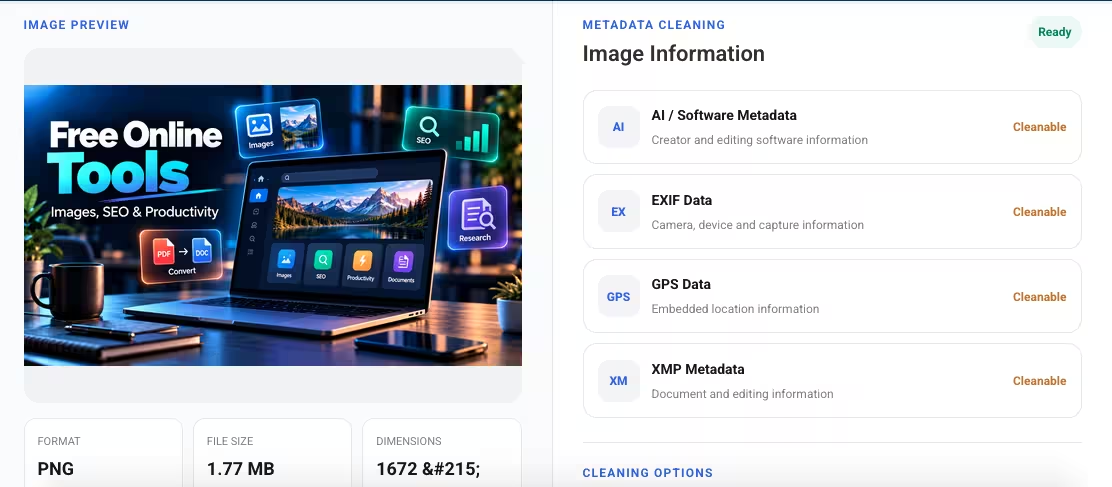
AI Metadata Cleaner: Remove Hidden Image Metadata
Digital images can carry information that viewers never see. AI Metadata cleaner gives users greater control over what remains attached to a file before it is shared or published.
- Function: Metadata removal gives users greater control over what remains attached to a file before it is shared or published.
- Use it when: An image is being shared publicly or externally.
Use the AI Metadata Cleaner when you want to review and remove hidden information from an image.
Geotag Photos Online: Add Location Data Easily
Some images need geographic information attached to them. This Geotag Photos Online can matter for business records, documentation, property-related requirements or other situations where location forms part of the image context.
- Function: Adds geographic metadata to an image.
- Use it when: Location information needs to accompany the photo.
Use Geotag Photos Online when geographic metadata needs to be added to an image. The tool can also connect contextually to the MCD geotagging article.
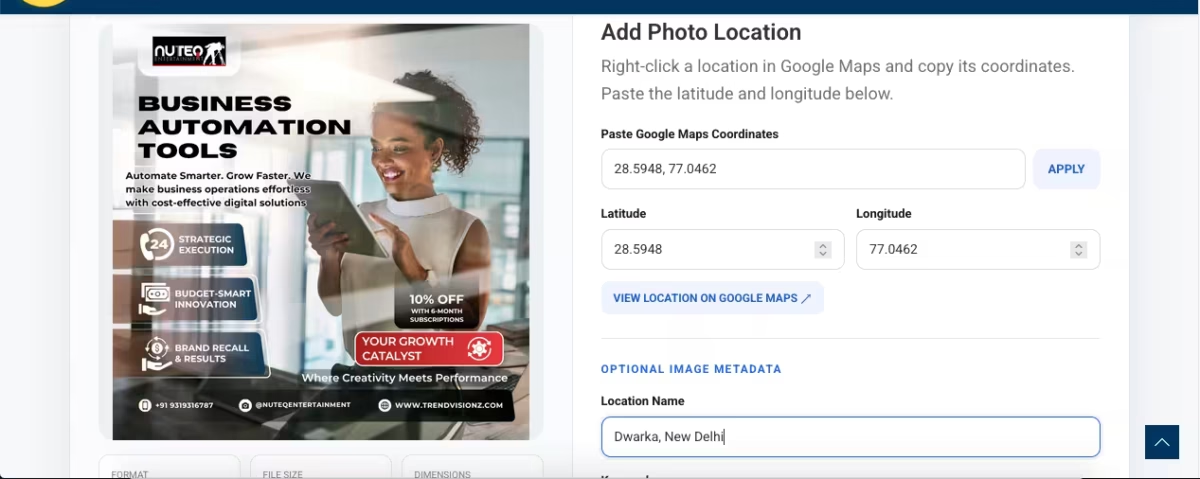
Image to Text: Extract Text From Images
Screenshots, scanned pages and photographed documents often contain useful text that cannot be copied directly. Text extraction removes the need to retype that information manually.
- Function: Extracts usable text from images.
- Use it when: Text must be copied from a screenshot or scan.
Use Image to Text when the information you need is trapped inside an image.
Image files are more than visual assets. An image carries more than what appears on screen. Its format, metadata, location data and embedded text can shape how easily it is opened, shared or reused. After those details are handled, attention shifts to search, content and document work.
Online Tools Simplify Search, Content and Document Tasks
Digital publishing also depends on how titles appear, how search listings are presented, how sources are referenced and how documents are reused. Free SEO tools, digital marketing tools and research utilities can simplify these smaller jobs before content is published, submitted or repurposed.
Headline Analyzer: Check Headline Structure Quickly
A headline shapes the first impression of any piece of content. The Headline Analyzer gives you a quick way to judge whether a title is clear, well-structured and ready to publish.
- Function: Evaluates headline structure and overall effectiveness.
- Use it when: A title is written but still needs a final review.
Use the Headline Analyzer when you want one of your SEO content tools to check headline quality before publishing. Headline quality is only one part of strong content. The right tools for bloggers can also improve readability before publication.
SERP Snippet Generator: Preview Search Result Snippets
Titles and descriptions can look very different once they appear in search results. A SERP Snippet Generator helps check how metadata may display before a page goes live.
- Function: A SERP preview helps check how titles and descriptions may display before a page goes live.
- Use it when: Writing or revising SEO titles and meta descriptions.
Use the SERP Snippet Generator when search-result presentation needs a final check before publishing.
Citation Generator: Create Structured Citations Quickly
Referencing sources manually can take time and lead to formatting mistakes. Formatting with Citation Generator becomes much easier when online research tools handle the repetitive structure.
- Function: Creates structured citations for referenced sources.
- Use it when: A report, article or paper needs properly formatted references.
Use the Citation formatting when accurate reference formatting matters for academic, research or editorial work.

PPT to Word: Convert Slides Into Documents
Useful information often remains locked inside presentation slides. Document conversion makes it easier to turn that material into editable content for reports, drafts or handouts.
- Function: Converts presentation content into an editable document.
- Use it when: Slides need to become a report, draft or handout.
Use PPT to Word when slide content needs to become an editable document for further writing or reuse.
Search, content and document work often depends on small checks completed at the right time. Once these repetitive tasks are simplified, the final step is deciding which tools genuinely deserve a place in the regular workflow.
Practical Checks Before Using Online Tools
A useful set of online tools should solve recurring problems without creating extra friction. The best productivity tools are simple, dependable and easy to trust. A smaller toolkit usually works better than a long list of saved utilities. Tools work best when the writing process itself is clear. These golden rules to write a blog provide a practical framework from planning to publication.

Before making any tool part of your regular workflow, check four things:
- Start First With the Task: Be clear about the exact problem you need to solve before choosing a tool.
- Check File Handling: Understand how the tool processes files before uploading private, confidential or sensitive material.
- Test the Output: Compare the result with the original before publishing, submitting or sharing it with others.
- Keep the Toolkit Small: Retain only digital productivity tools that consistently save time, reduce rework or simplify routine work.
The goal is not to collect more tools. Build a small, trusted set around the tasks you repeat most often, and keep only those that continue to make the work easier.
FAQs: Online Tools
Yes, for focused tasks. Free online tools can help content creators, marketers and small teams handle image compression, resizing, file conversion and search previews efficiently. Complex editing, batch processing or specialised production work may still require full desktop software.
A Headline Analyzer can review title structure, while a SERP Snippet Generator previews search titles and descriptions. Image Compressor and Image Resizer can also support website optimisation by reducing unnecessary image weight and preparing correctly sized assets.
It depends on the task and settings. Compression can reduce file size with minimal visible change, while resizing and conversion may affect quality if dimensions or formats are changed aggressively. Always compare the processed image with the original.
Also Read:
- How to Balance Travel and Remote Work in a Digital World
- The Efficiency Economy: How Businesses Must Be Designed to Scale in 2026
Conclusion
Routine and everyday digital tasks often take up more time than their complexity suggests. The right online tools remove that friction by solving one specific problem quickly, without forcing every task into a larger software workflow.
Across images, metadata, search, research and documents, the 12 TrendVisionz tools are built around practical needs that appear repeatedly in everyday digital work. Each serves a defined purpose, whether that means reducing file size, checking a snippet, extracting text or converting content.
A useful toolkit should stay focused. Keep the tools that consistently save time, maintain output quality and reduce repeated effort. Simpler workflows usually become stronger workflows when every tool earns its place.
For more practical digital-growth insights, explore the Worth category on TrendVisionz. Within it, the Marketing, Growth & Digital Visibility cluster covers the tools, strategies and visibility systems shaping modern digital work.
Stay Connected with Me
Anshuman Mahajan is a Digital Marketing Strategist, SEO Specialist, and Co-Founder of TrendVisionz. With expertise in ROI-focused growth strategies, brand development, and media solutions, he helps businesses navigate the fast-changing digital landscape with clarity and confidence.
- Explore my work: TrendVisionz | Nuteq Entertainment
- Read our newsletters: BizTech Chronicle
- Guest writer: BizCatalyst360 | Industry Blogs
- Courses & Certification: B.Com (Hons), University of Delhi | Digital Marketing (Shaheed Sukhdev College of Business Studies) | SEO Internship, ClickSlice (London)
- Join the community: LinkedIn Group – Digital Marketing & Content Creation World
- Connect with me: LinkedIn | BizTech Chronicle | #GrowWithAnshuman
- Share your review: Leave your feedback on Google — it helps us grow.
- Subscribe: Be part of our 1.95 Lakh+ YouTube family
Believe. Transform. Succeed. Let’s grow together.


6 comments
[…] Posts Free Online Tools: Images, SEO and Productivity Maintaining Newspaper Press Performance During Peak Production The Hindu Tilak: Sacred Marks […]
[…] Posts Free Online Tools: Images, SEO and Productivity Maintaining Newspaper Press Performance During Peak Production The Hindu Tilak: Sacred Marks […]
[…] Posts Free Online Tools: Images, SEO and Productivity Maintaining Newspaper Press Performance During Peak Production The Hindu Tilak: Sacred Marks […]
[…] Posts Free Online Tools: Images, SEO and Productivity Maintaining Newspaper Press Performance During Peak Production The Hindu Tilak: Sacred Marks […]
[…] Posts Free Online Tools: Images, SEO and Productivity Maintaining Newspaper Press Performance During Peak Production The Hindu Tilak: Sacred Marks […]
[…] Posts Free Online Tools: Images, SEO and Productivity Maintaining Newspaper Press Performance During Peak Production The Hindu Tilak: Sacred Marks […]