
My team was working late into the night on a client project. They needed to analyse the website’s technology, but existing tools had exhausted their free credits. That sparked a question: why should website optimization begin with such barriers?
Technology choices shape SEO possibilities. WordPress powers 41% of websites worldwide and holds nearly 59% of the known CMS market. WordPress, Shopify and custom platforms require different optimization approaches, making technology selection crucial for SEO.
As a digital growth strategist, I work closely with SEO and digital marketing teams to improve website performance and search visibility. My experience spans technical SEO, digital strategy and practical optimization, helping teams make informed decisions that support organic rankings and measurable growth.
In this edition… we explore how technology choices shape website optimization. SEO and digital marketing teams need to understand what powers a website. Planning a Technical SEO Audit or redesign? This guide helps you identify the right checks and make better decisions.
Technology Choices Decide Which SEO Fixes Are Possible
Website technology influences how SEO improvements are implemented. Google Search Central recommends making content accessible and understandable to search engines. However, the CMS, theme and hosting determine how teams apply these principles.
A website Technology Stack is the combination of software and infrastructure powering a website. It includes the CMS, theme, hosting and supporting technologies. These components influence website performance, technical flexibility and how SEO improvements are implemented across different platforms.
A Free Online Tool Gives the First View
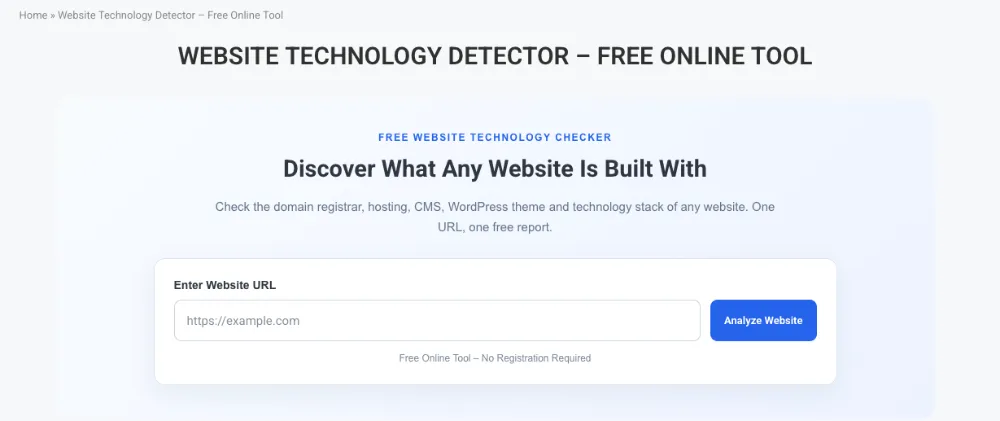
The Website Technology Detector helps SEO and digital marketing teams identify technologies behind websites. This free online tool provides technical information that can guide further investigation. Users begin by entering a website URL.

The report covers domain details, hosting, CMS, theme, Technology Stack and SSL information. These findings provide useful context before planning optimization. However, some technologies remain unidentified when websites conceal technical signals. Teams should treat these results as indicators, not complete audits.
Understanding the Technology Stack is only the first step. The real value comes from identifying each component and knowing which SEO improvements it supports.
Infrastructure Findings Set Website Optimization Priorities
Every finding in a technology report suggests a different follow-up check. Domain records, hosting details and CMS information reveal how websites operate. Reading these signals helps SEO teams prioritize website optimization before making technical changes.
Domain, Hosting and DNS Show How a Site Is Served
Infrastructure findings help SEO teams understand domain management, hosting arrangements and network settings before planning a migration or redesign.
- Domain and WHOIS: ICANN’s RDAP lookup can provide registrar, status and expiry details. Privacy restrictions may limit available information.
- Hosting Checker: IP, network and CDN details help investigate website delivery. CDNs may conceal the origin host.
- DNS lookup: Nameservers and DNS records support migration planning. An NSLookup Hosting Checker offers related checks.
CMS and Theme Detection Shapes Platform-Specific Work
Identifying a website’s platform helps SEO teams choose relevant fixes instead of applying the same approach everywhere.
- CMS: WordPress, Shopify and Wix offer different optimization settings and workflows.
- WordPress Theme Detector: Visible signals may reveal themes, parent themes or builders. Custom implementations can remain unidentified.
- Plugins: Public signals may identify SEO or caching plugins, but cannot reveal every installed plugin.
For me, technology findings are a starting point, not the final answer. The real SEO work begins with audits, targeted fixes and measuring results that matter.
Technical SEO Audit and On-Page SEO Complete Website Optimization
Technology detection identifies what powers a website. However, improving performance requires further checks. A Technical SEO Audit examines structural issues, while On-Page SEO addresses content relevance. Both play distinct roles in website optimization.
Technical SEO Audit vs. Technology Detection: A technology detector identifies platforms, hosting and supporting software. A Technical SEO Audit examines crawling, indexing, canonical URLs, speed and mobile usability. Detection provides technical context, while auditing identifies problems that may affect search visibility.
SSL Certificate and On-Page SEO Checks
An SSL certificate enables HTTPS encryption, protecting data exchanged between browsers and websites. Google introduced HTTPS as a lightweight ranking signal in August 2014. However, HTTPS alone cannot guarantee security or higher rankings.
On-Page SEO covers titles, meta descriptions, headings, internal links and search intent. These elements improve content clarity and relevance. The TrendVisionz SERP Snippet Generator helps teams review search titles and descriptions before publishing.
Can a Technology Detector Improve Website Optimization on Its Own?
No. Technology detection provides technical context, not direct ranking improvements. Effective website optimization requires targeted technical fixes, relevant content and On-Page SEO. Google Search Console helps monitor indexing and organic search performance.
For me, the practical sequence is clear: identify the platform, audit technical issues and implement necessary fixes. A structured checklist makes these steps easier to follow.
A Website SEO Checklist Built on Technology Findings
An SEO agency takes on a new client website. Before starting an audit, the team runs the Website Technology Detector. It identifies available platform and infrastructure details.

The Website SEO Checklist helps organize the next steps.
- Confirm the Platform First: Identify the CMS, theme, hosting and SSL details. Check whether the existing technology supports planned improvements. Record any unidentified components before recommending technical changes.
- Check Indexing and HTTPS: Use Google Search Console to examine indexing status and canonical URLs. Verify HTTPS availability, certificate validity and mixed-content issues separately. Resolve problems affecting search accessibility.
- Review Speed and On-Page SEO: Test loading performance and mobile usability. Review page titles, headings, internal links and content relevance. Use the TrendVisionz SERP Snippet Generator to assess how titles and descriptions may appear in search results.
- Read Results as Indicators: A “Not identified” result doesn’t confirm that technology is absent. CDNs can conceal hosting details, while custom builds may hide recognizable signals. Investigate uncertain findings before making changes.
For me, a useful SEO checklist connects every finding with a practical action. Technology detection provides context, while audits and ongoing measurement guide improvements.
Conclusion
Effective website optimization begins with knowing what powers your website. The right technology insights help SEO teams identify limitations before recommending changes. This approach reduces guesswork and supports better decisions.
Start by identifying the platform and reviewing the Technical SEO Audit. Check the SSL certificate, then improve On-Page SEO elements that affect search visibility.
Technology findings are indicators, not complete audits. Recheck important settings after major updates. Monitor indexing, organic ranking and website performance regularly. For me, consistent measurement matters more than expecting immediate results.
Explore the Worth category on TrendVisionz for practical digital insights. Discover more tools and strategies in Marketing, Growth & Digital Visibility to strengthen your SEO decisions and website performance.
✍️ Guest Write with Us
At TrendVisionz, the digital venture of Nuteq Entertainment Pvt Ltd, we welcome contributors who share our passion for storytelling, digital marketing, and innovation. Whether it’s an article, case study, or industry insight that educates, inspires, or entertains — we’d love to feature your perspective.
- Explore our work: Nuteq Entertainment | TrendVisionz | Author Profile
- Read our newsletters: Transforming Lives | BizTech Chronicle | Nuteq Newsline | Growth Catalyst
- Guest Contributions: BizCatalyst360 | Praja Today
- Books: Go Mindfulness: Practices for Professionals Coached
- Join the community: LinkedIn Group – Digital Marketing & Content Creation World
- Connect with me: LinkedIn | Twitter | #StoryforBusiness
- Share your review: Leave your review on Google — your feedback helps us grow.
Follow me on Twitter or LinkedIn. Check out our website.
How to Contribute:
Send your pitch or draft to Editor: anujmahajan@trendvisionz.com
FAQs: Website Optimization
Does a website technology detector improve SEO rankings?
No. A website technology detector shows the CMS, hosting, theme and tech stack behind a site. It gives context for website optimization. Rankings improve through technical fixes, on-page SEO and useful content.
What should a website SEO checklist include?
Identify the CMS and hosting first. Use Search Console to review indexing. Verify HTTPS separately, test page speed, and review mobile usability. Finish with titles, meta descriptions, headings, internal links and content quality.
Why does the detector show "Not identified" for some websites?
Some sites hide public signals. A CDN can mask the origin host, and custom themes or private code leave no visible trace. A "Not identified" result means the tool couldn't confirm the technology, not that it is absent.


